AdsPower Review: How to Safely Manage Hundreds of Accounts and Scale Traffic

Managing multiple online accounts can quickly become complicated, especially when platforms use browser fingerprints and other signals to detect accounts that appear to be linked. This is one of the reasons why anti-detect browsers are becoming so popular with people who work with multiple accounts.
AdsPower is one of the more well-known names in this space, with more than 9 million users worldwide. It provides separate browser environments for handling different accounts, along with tools for automation, proxy management, and team collaboration. In this article, we will explore what an anti-detect browser is, where it is used, and what makes AdsPower unique among other solutions.
What is anti-detect browser?
Anyone running multiple accounts on one or more platforms may have experienced account bans at some point. There are many reasons for suspensions, but the most common is having more than one account, which violates most platforms’ rules. But how do they learn?
Platforms often use browser fingerprints to make this decision. Browser fingerprints are information gathered about the software and hardware of your device, such as IP address, font, resolution, WebRTC, Canvas, etc. Browser fingerprints, like real fingerprints, point to an online identity. Having multiple accounts on the same device and IP address is treated as if the same user is running multiple accounts, which leads to the accounts being banned.
The solution to this problem is antidetect browser. In an antidetect browser you can open several browser profiles and customise fingerprints of each one of them. When you run your accounts in separate profiles, you are actually hiding your real fingerprints or say, real identity. In this way, your accounts will be seen as operated by different identities, and there will be no suspensions.
Why Use an Antidetect Browser for Multi-Account Management?
Multiple accounts are common in traffic arbitrage, affiliate marketing, paid advertising and e-commerce as part of the workflow. A traffic arbitrage team can be running different campaigns and traffic sources at the same time. An affiliate marketer can be using separate accounts to promote different products or offers. In paid advertising, agencies often have to handle ad accounts for multiple clients, each with its own campaigns and settings.
E-commerce merchants have similar needs when running multiple stores, whether they are selling in different regions or in different product categories.
Having more accounts can make it messy to manage everything with just one browser. Separate browser profiles give each account its own environment, making it easier to sort and manage hundreds of accounts from the same computer.
How AdsPower Helps You Scale Multiple Accounts Safely
1. Consistent Fingerprints Across Profiles
The fingerprint is one of the core components of an antidetect browser, and that’s where AdsPower puts a lot of its focus. AdsPower doesn’t just change some browser values; it uses a kernel-level fingerprint architecture with fingerprint behaviour built into the Chromium source code.
Each profile can be configured with 50+ fingerprint parameters from user agent, language and timezone to Canvas, WebGL, fonts, screen resolution and hardware settings. In addition to Chromium and Firefox kernels, AdsPower also supports iOS and Android device fingerprints.
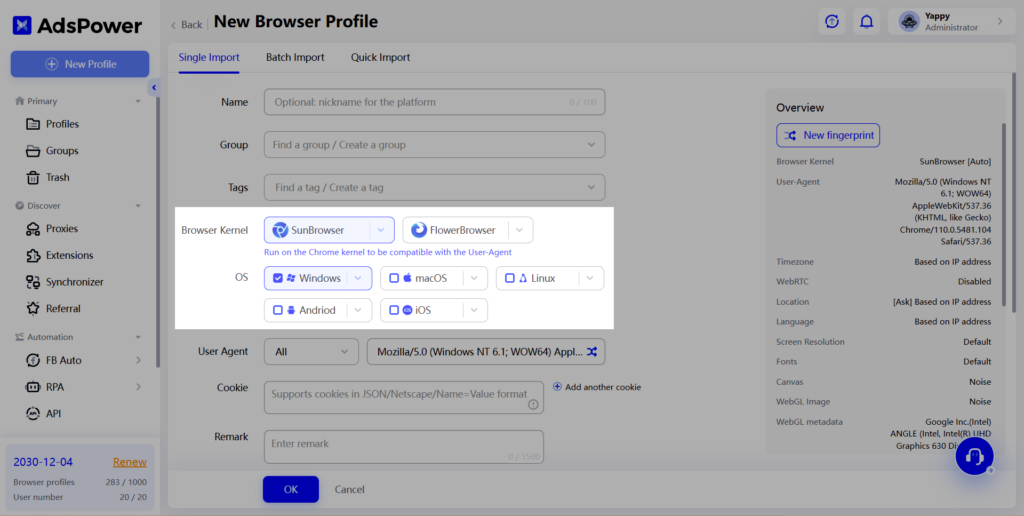
If you’re managing hundreds of accounts, the biggest advantage for users is consistency. Each profile has its own fingerprint and browser environment, which helps avoid the obvious inconsistencies that can make accounts appear linked.
2. Proxy Management for Each Account
A separate fingerprint is only part of the setup. Each profile can also be connected to its HTTP, HTTPS, or SOCKS5 proxy, giving accounts their own outbound IP. AdsPower also includes a built-in proxy checker, so you can check the IP address and location before assigning it to a profile. The profile’s timezone and language can also be matched with the proxy location, helping avoid simple inconsistencies such as a US IP combined with an entirely different timezone.
3. Automation for Large-Scale Operations
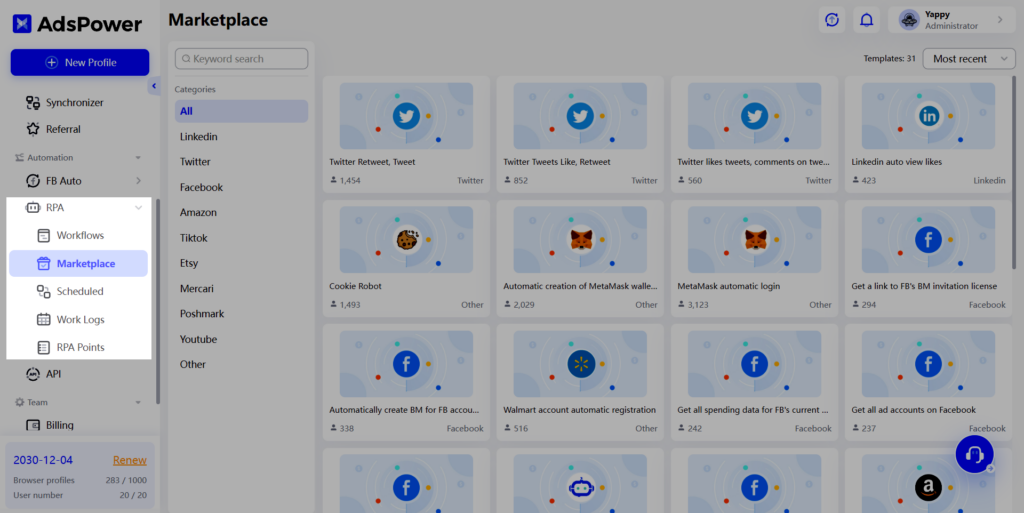
Managing hundreds of accounts manually is simply not practical. AdsPower’s built-in automation tools help reduce the amount of repetitive work without requiring users to build everything from scratch. The Multi-Window Synchronizer can mirror clicks, scrolling, typing, and mouse movements across multiple profiles, while RPA lets you build workflows visually or use ready-made templates. For more advanced setups, Local API and MCP support integrations with Selenium, Puppeteer, Playwright, and AI tools such as Claude and Cursor.
4. Bulk Management and Team Collaboration
Once the number of profiles starts to grow, organisation becomes as important as automation. AdsPower lets you group profiles with folders and tags, apply bulk actions, and manage cookies within individual profiles.
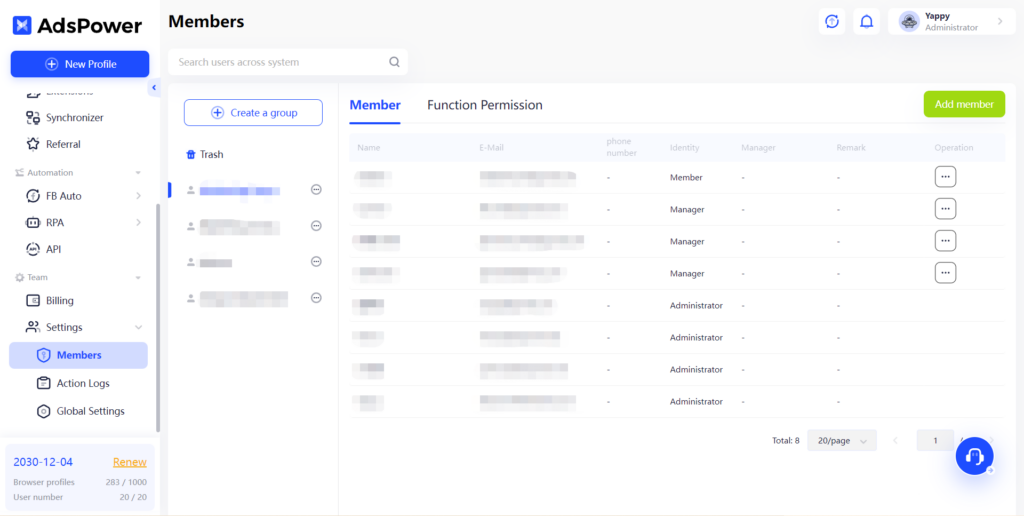
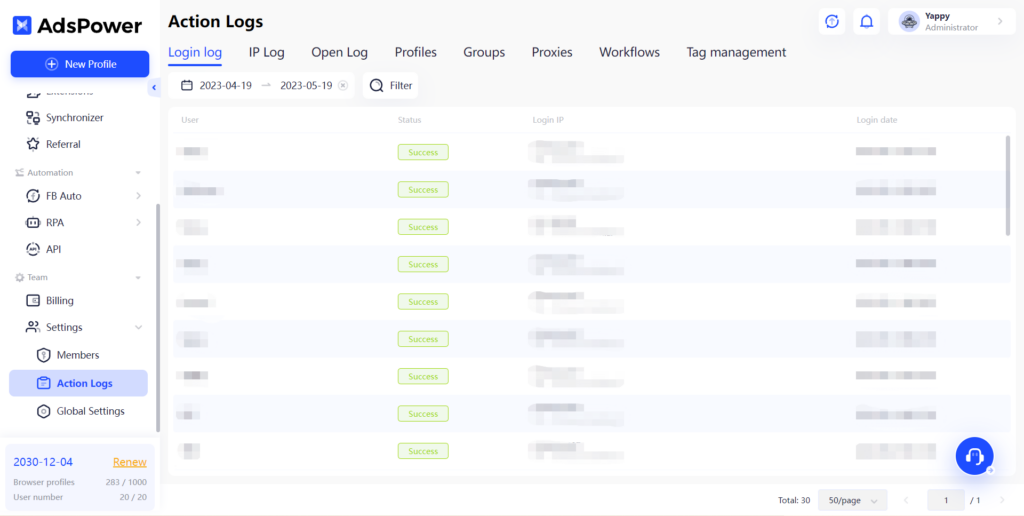
For teams and agencies, role-based permissions, operation logs, and profile sharing make it easier to divide accounts between team members without giving everyone access to everything. This is particularly useful when different people are handling different clients, regions, or campaigns.
5. Security and Performance
As the number of accounts and profiles grow, security becomes more important. AdsPower encrypts profile data locally and in transit and offers features such as 2FA, login IP allowlists, and abnormal activity alerts. It is also SOC 2 Type II, ISO 27001, and ISO 27701 certified.
Other recent updates have included performance improvements like faster profile launches and lower memory usage. If you’re dealing with a lot of profiles, little improvements like these can make a noticeable difference to everyday use.
6. Pricing
AdsPower offers a free tier with 2 browser profiles, while paid plans scale with the number of profiles and team members you need. The Professional plan starts at $7.2/month with annual billing for 10 profiles, while the Business plan starts at $48.8/month for 200 profiles. Enterprise plans are available for teams managing 5,000+ profiles. Longer subscription periods also come with additional discounts which can make the cost more manageable for teams running profiles over the long term.
Bottom line
AdsPower integrates fingerprint management, proxy settings, automation and profile management into one comprehensive platform. So if you’re managing more accounts, you can spend less time switching tools and have more control over each profile.
Whether it’s traffic arbitrage, affiliate marketing, paid ads or e-commerce the challenge is the same: once you start managing accounts at scale, how do you keep everything organised and avoid unnecessary overlap between profiles? AdsPower provides the tools to do that, including separate fingerprints, proxies, RPA, synchronizer, and team management.
If you’re planning to scale past a few accounts, it’s a good idea to test AdsPower with a few profiles first to see how well it fits into your workflow before scaling up.