Google Shopping: The Visual Sales Architect That Knows Your Customer’s Desires Better Than They Do

Google Shopping is more than just “ads with pictures”. It is perhaps the most honest and, simultaneously, the most ruthless tool in the modern e-commerce arsenal. If Amazon is a massive hypermarket where you rent a shelf, Google Shopping is the global GPS that intercepts a user the moment a desire arises and guides them straight to your checkout counter.
The Psychology of Visual Search

Why are text-based search ads slowly dying out in the product business? The answer lies in biology. The human brain processes visual information 60,000 times faster than text.
When a user types “Nike running shoes” into the search bar, a text ad forces them to think: read the headline, analyze the description, imagine the product. Google Shopping (Product Listing Ads) works differently. It shows:
- A Photo (visual hook).
- The Price (solvency filter).
- The Store Name (trust factor).
This creates a “main street window shopping” effect. A user who clicks on such an ad is already half-qualified. If they clicked on a card with a $150 price tag, it means the price doesn’t scare them. You aren’t paying for clicks from curious users looking for “cheap” if your product is premium. You get traffic that is red-hot and ready for a transaction.
The Three Pillars of the Google Ecosystem
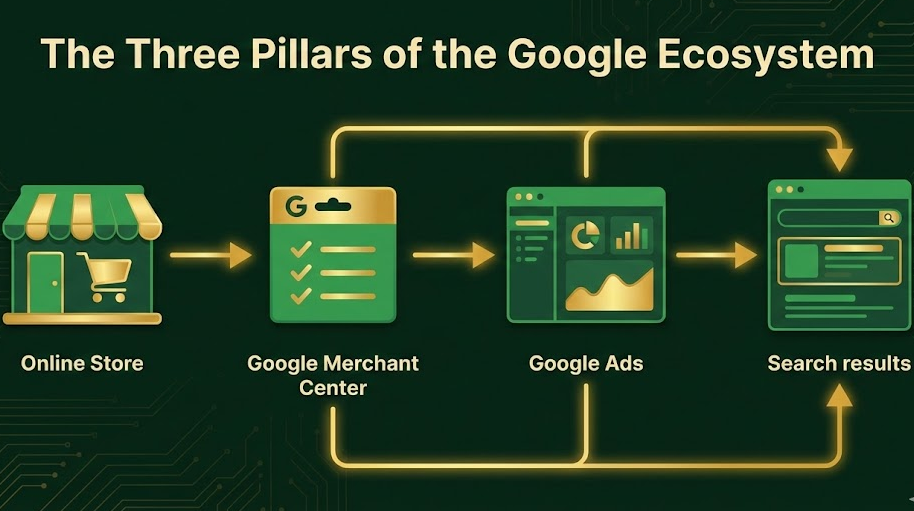
For a beginner, the system can seem convoluted. Unlike Facebook, where everything happens in one cabinet, here we need to link three distinct entities. If even one link fails, the system collapses.
1. The Online Store (Your Fortress)
This is the baseline. Google, unlike arbitrage networks, is extremely demanding about the quality of the landing page. This cannot be a one-pager thrown together in 15 minutes. Critical Requirements:
- Functional cart and online checkout.
- SSL certificate (https protocol).
- Clear, legally sound “Shipping & Payment” and “Return Policy” pages.
- Real contact details (physical address, phone number, email).
2. Google Merchant Center (The Customs)
This is the heart of product advertising. GMC isn’t an ad cabinet; it’s a data warehouse for your inventory. This is where moderation happens. Google Merchant Center checks if your product matches the image, if the price on the site matches the price in the feed, and if you are trying to sell prohibited items. This is where 80% of beginners get stuck, receiving a ban for “Misrepresentation,” which we will discuss below.
3. Google Ads (The Control Panel)
This is where we spend the money. Data is pulled here from the Merchant Center, and this is where we tell Google: “I’m ready to pay $0.50 for a click on these sneakers, but don’t show them to people searching for ‘free’.”
The Data Feed as the Foundation of the Universe

If Content is King in SEO, then the Feed is King in Google Shopping. This is a structured file (usually XML or a spreadsheet) that describes every single one of your products.
An error in the feed costs money. If you fill out attributes incorrectly, Google simply won’t show your product, or it will show it to the wrong audience.
Anatomy of the Ideal Feed
Let’s break down the key attributes that influence sales:
ID
A unique product identifier. It must remain constant. If you change the ID, Google treats it as a brand-new product, and all accumulated history/statistics will reset to zero.
Title
The most important element. Google doesn’t use keywords that you manually input (like in standard search ads). It pulls keywords from your Title.
- Bad Title: Men’s Running Shoes
- Good Title: Nike Air Zoom Pegasus 39 Men’s Running Shoes Black Size 10 Mesh
The Formula for Success: Brand + Product Type + Gender + Model + Color + Size + Material The closer a keyword is to the beginning of the title, the more weight it carries for the algorithm.
Description
Here you can use synonyms and additional specs. If you wrote “hoodie” in the title, add “sweatshirt,” “pullover,” or “jumper” in the description to capture related search queries.
Google Product Category
This is Google’s internal taxonomy. Don’t be lazy – select the category as deeply as possible. Not just: Apparel & Accessories But specifically: Apparel & Accessories > Clothing > Activewear > Boxing Shorts This helps the algorithm understand who to show ads to and lowers the cost per click (CPC).
Custom Labels
The secret weapon of experienced marketers. These fields are not visible to the user, but they allow you to filter products inside the ad cabinet. Examples:
- Seasonality: “Winter”, “Summer”.
- Margin: “High Margin”, “Low Margin”.
- Bestsellers: “Top Sellers”.
Using labels, you can, for example, increase bids only on high-margin items or turn off ads for winter jackets when April arrives.
Battle of Strategies: Standard Shopping vs. Performance Max

When the feed is ready and moderation is passed, you face a choice: how to launch? Currently, there are two main camps in Google.
Standard Shopping (Classic Control)
The old-school format that gives you full manual control.
- Pros: You see the actual search terms users typed. You can add negative keywords (words you don’t want to appear for). You can adjust bids on specific products.
- Cons: Requires a lot of time for management and analysis.
- For whom: For the start, to gather data and understand how people search for your product.
Performance Max (Rise of the Machines)
The new standard from Google. This is a “smart” campaign that operates like a black box. You give it a feed, a budget, creatives (images/video), and a goal (sales). Then, Artificial Intelligence decides where to show the ad: Search, Images, YouTube, Gmail, or Partner Sites.
- Pros: Incredible reach. Automatic optimization. Works 24/7.
- Cons: You don’t see detailed statistics by channel. You cannot easily exclude keywords (without help from a Google rep or tricky workarounds). There is a risk of draining the budget on low-quality traffic in YouTube or Display.
- For whom: For scaling. When the account already has a conversion history (at least 30-50 sales), PMax starts working like a sniper.
Technical Nuances and Hidden Rocks
In our case study, we mentioned issues with bans. Let’s expand on this topic, as it is often the insurmountable wall for many.
The Curse of “Misrepresentation”
The most common reason for an account ban. Google believes your site looks untrustworthy. What triggers this ban:
- Price Mismatch: If the feed says $100, but the price changes in the cart (e.g., unexpected tax or mandatory insurance is added) – that’s a ban.
- Fake Discounts: If the entire site is littered with “5 minutes left” countdown timers – Google hates this.
- Images: Watermarks, text overlays on photos, poor quality – all lower the system’s trust.
- Contacts: If the site lists an email on a free domain (gmail.com) instead of a corporate one (info@myshop.com), that’s a red flag.
Image Optimization
Google Shopping is a showcase.
- Background: Ideally white or transparent.
- Framing: The product should occupy at least 75% of the image area.
- Lifestyle Photos: Acceptable for clothing and furniture, but the main photo (the first one in the feed) should be a product shot.
Site Speed
Google factors in user experience. If a person clicks an ad and the site takes 10 seconds to load, you’ve lost a customer, and Google will lower your account’s quality score. Optimize images and scripts on the site.
How to Survive and Thrive
Launching Google Shopping is a marathon, not a sprint.
The First 48 Hours: The learning phase. Do not touch the settings. Google is testing the audience. Spending might be uneven.
The First 2 Weeks: Data gathering. If you launched Standard Shopping, go to the “Search Terms” report and ruthlessly add negative keywords. If you sell “leather bags” and people are finding you via “bag repair” or “DIY bags” – add “repair” and “DIY” to your negative list immediately.
Month 1 and Beyond: Analyze ROAS (Return on Ad Spend). If the campaign is bringing in 500% ROAS (for every $1 spent, you get $5 in revenue), start carefully increasing the budget by 10-20% per week. Sharp budget increases can reset the algorithm’s learning.
Conclusion

Google Shopping has changed the rules of the game. It removed the extra steps between “I want” and “I buy.” For businesses, this means the ability to compete with giants without having millions in branding budgets. All you need is a quality product, a correct feed, and patience in tuning the algorithms.
This is not a “money button,” as some gurus might promise. It is a complex engineering tool. But once you tune it correctly, it turns into an asset that works for you while you sleep, eat, or strategize, rather than manually hunting for clients.
However, we understand that not everyone wants to become a “feed architect” or spend their nights fighting with moderation support. Mastering these nuances requires time, nerves, and a budget for errors. If you don’t want to dive into this technical deep end yourself, simply trust ScroogeFrog. We have already navigated these waters and know exactly how to bypass the hidden rocks. You focus on your business growth, and let us handle the algorithms.